
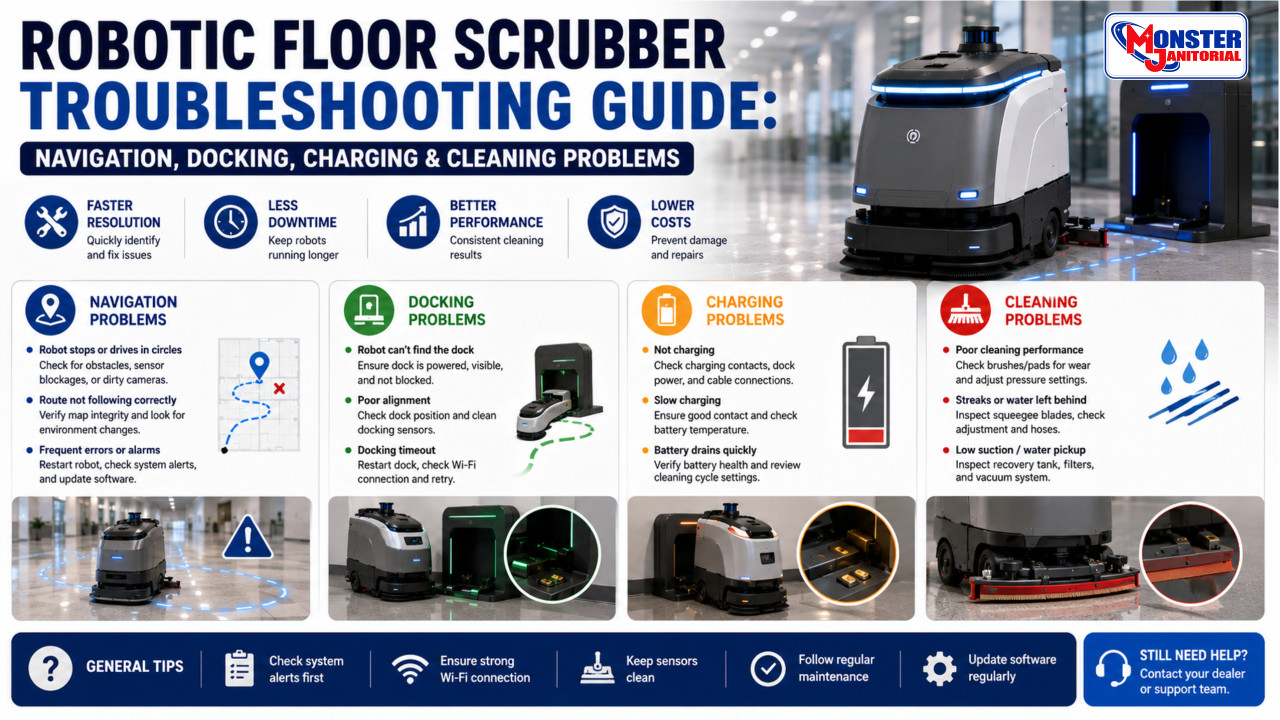
Robotic Floor Scrubber Troubleshooting Guide: Navigation, Docking, Charging & Cleaning Problems
Robotic floor scrubbers can stop, miss areas, fail to dock, leave water behind, or display system alerts for many different reasons. The best troubleshooting approach is to start with the simple checks first, confirm the operating environment, and move to service only when the basic causes have been ruled out.
Exact troubleshooting steps vary by manufacturer and model. Always follow the operator manual, on-screen instructions, and approved service procedures for the specific machine.
What Should You Check First?
Start by identifying the exact problem and checking for alerts or error messages. Then confirm basic operating conditions such as battery level, water and solution levels, brushes or pads, squeegee condition, clear travel paths, clean sensors, and proper dock access. If the problem continues after the basic checks, follow the manufacturer’s troubleshooting procedure or schedule service.
A Simple Robotic Scrubber Troubleshooting Process
Avoid changing multiple things at once. A step-by-step process makes it easier to identify the actual cause of the problem.
- Identify the problem. Note what happened and record any alerts, codes, or unusual behavior.
- Check the basics. Review battery level, solution, brushes, squeegee, sensors, route conditions, and obstacles.
- Test again. Run the machine again after correcting the obvious issue.
- Escalate if needed. If the problem continues, follow the manufacturer’s service procedure.

A simple troubleshooting flow helps separate basic operating issues from problems that may require technical service.
Robot Won’t Start
If the machine does not start, begin with normal operator-level checks before assuming there is an electrical failure.
- Confirm the machine is powered on correctly.
- Check the battery charge level.
- Confirm emergency-stop controls are in the correct position.
- Check for on-screen alerts or required operator actions.
- Confirm tanks, covers, or interlocks are positioned correctly if the machine monitors them.
- Follow the manufacturer’s start-up sequence.
Robot Stops During a Route
A robot can stop for many reasons, including an obstacle, blocked sensor, route change, low battery, system alert, or a condition it cannot safely resolve on its own.
Check the immediate area around the machine, review the system message, inspect accessible sensors, and confirm the planned route is still open.
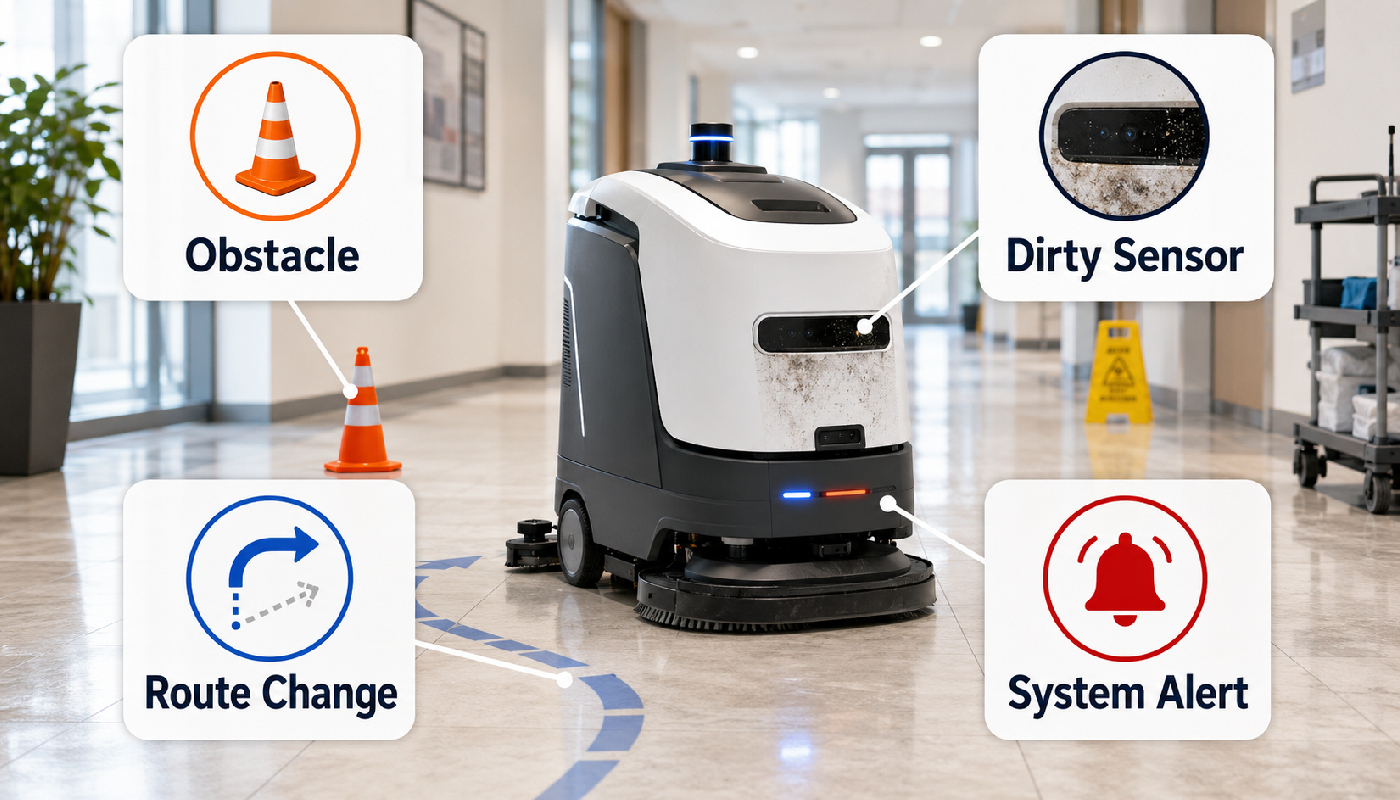
Route interruptions can come from the facility environment, sensor condition, route changes, or machine alerts.
Navigation or Localization Errors
Localization problems occur when the robot has difficulty determining where it is relative to its saved map or route.
- Clean accessible navigation sensors.
- Check whether large furniture, displays, pallets, equipment, or barriers have changed the environment.
- Make sure the robot has not been manually moved to an unexpected location.
- Review any localization or mapping alert on the machine.
- Follow the platform’s approved recovery or relocalization procedure.
Robot Misses Areas or Skips Sections
Missed areas do not always mean the navigation system has failed. The robot may be responding to temporary obstacles, changed traffic patterns, blocked aisles, safety clearance requirements, or route settings.
- Look for carts, pallets, chairs, displays, cones, or equipment blocking the route.
- Review route completion or cleaning reports where available.
- Check whether the environment has changed since the route was created.
- Retest the route after clearing the area.
Obstacle Detection Problems
Different robotic platforms respond differently to obstacles. Some may reroute, some may stop and wait, and others may request operator assistance.
If obstacle behavior changes unexpectedly, inspect the surrounding area and accessible sensor surfaces, then review any alerts before restarting the route.
Dirty or Blocked Sensors
Dust, splash residue, fingerprints, floor-cleaning solution, or debris can interfere with cameras, LiDAR windows, and other accessible sensors.
Use only the cleaning method recommended by the manufacturer. Do not use abrasive materials or harsh chemicals on lenses or sensor windows.
Robot Won’t Dock
Docking problems can be caused by blocked access, poor alignment, dirty charging surfaces, changed dock position, sensor contamination, or another system condition.
- Clear the approach path to the dock.
- Confirm the dock has not been moved.
- Inspect accessible docking and navigation sensors.
- Check charging contacts for visible contamination.
- Follow the manufacturer’s docking reset or retry procedure if provided.
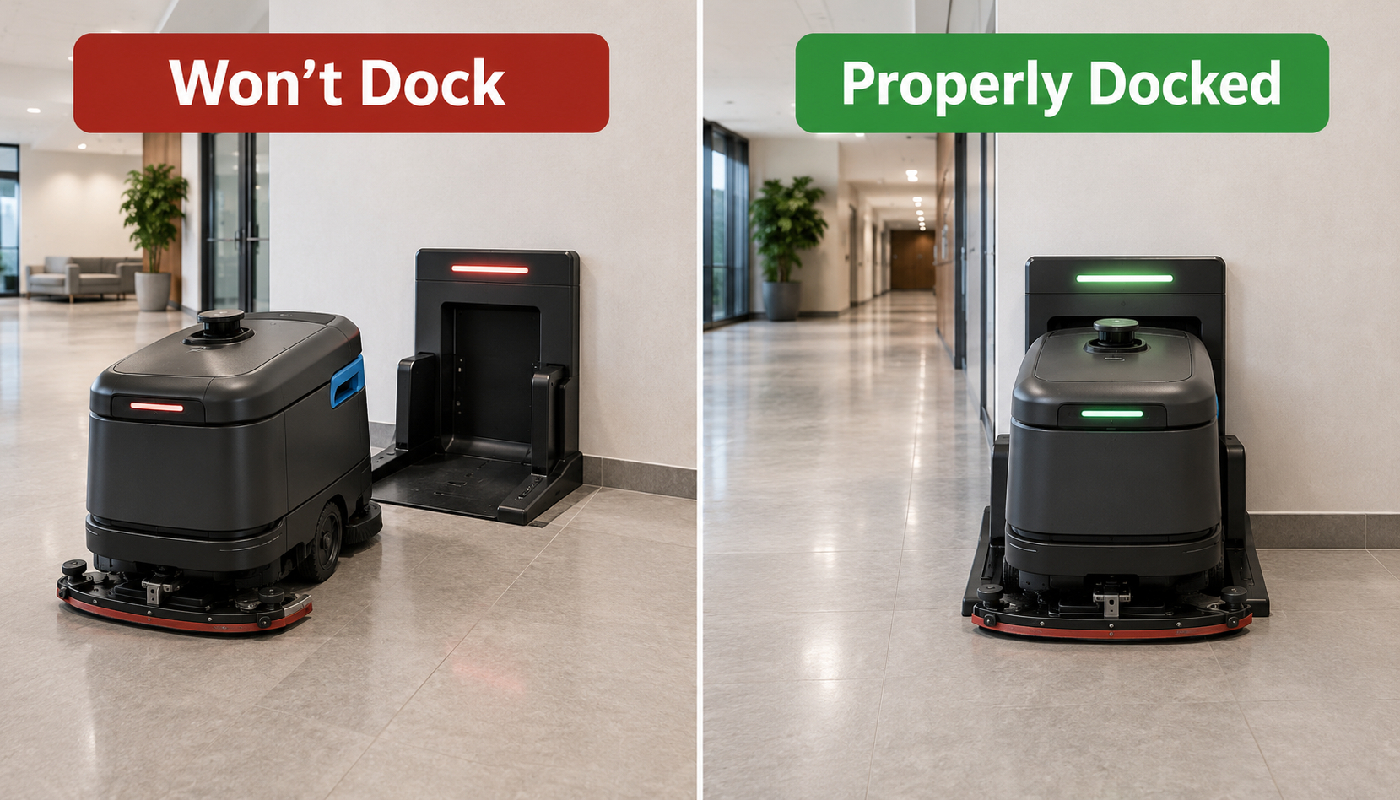
Docking depends on clear access, correct alignment, clean sensors and contacts, and proper dock positioning.
Robot Won’t Charge
If the robot reaches the dock but does not charge, confirm that it is fully seated and that the charging system is powered and unobstructed.
- Confirm proper dock alignment.
- Inspect charging contacts for visible dirt or contamination.
- Check for on-screen charging or battery alerts.
- Confirm the dock has power according to the manufacturer’s procedure.
- Do not open or repair internal charging components unless trained and authorized.
Poor Water Pickup or Water Left Behind
Poor recovery is usually related to the water-recovery system rather than the robotic navigation system.
Start with the squeegee, recovery hose, recovery tank, filters or screens, and vacuum system before assuming there is a more complex problem.
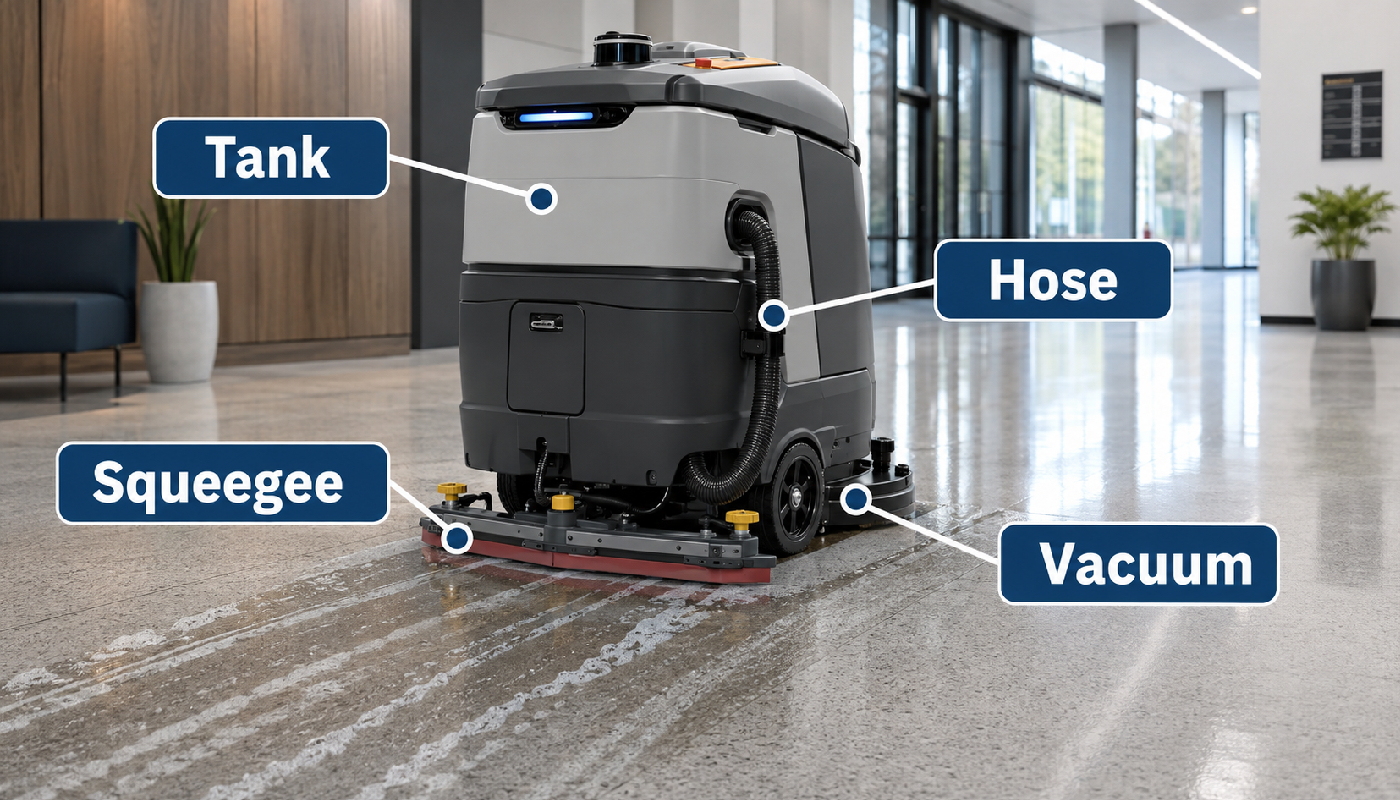
When a robotic scrubber leaves water behind, inspect the squeegee, hose, tank, and vacuum-recovery system first.
Streaks or Water Trails Behind the Robot
- Remove debris from the squeegee blade.
- Check for cuts, waves, curling, or uneven blade wear.
- Confirm the squeegee assembly is secure and positioned correctly.
- Inspect the recovery hose for clogs or loose connections.
- Confirm the recovery tank, float, filters, or screens are not restricting airflow.
Brushes or Pads Are Not Cleaning Well
Poor cleaning does not necessarily indicate a robotic-system problem. Cleaning quality still depends on the same basic variables as a traditional auto scrubber.
- Inspect brushes or pads for excessive wear.
- Remove wrapped debris and buildup.
- Confirm the correct brush or pad is installed.
- Verify the cleaning chemical and dilution are appropriate for the floor and machine.
- Check whether the floor requires a deeper cleaning process than routine scrubbing.
Recovery Hose or Vacuum Problems
Inspect accessible hoses for blockages, cracks, pinching, or loose connections. Also check accessible filters, screens, tank seals, and float systems. Internal vacuum-motor or electrical diagnosis should be performed only by qualified service personnel.
Route Problems After Facility Changes
Robotic routes may be affected when the facility changes significantly after mapping or route setup.
New displays, furniture, equipment, storage locations, construction barriers, pallet staging, or other changes can reduce route access or alter the environment the robot expects. If a route that previously worked starts failing, compare the current area with the conditions under which the route was originally created.
Connectivity or Software Alerts
Some platforms use Wi-Fi, cellular connectivity, cloud software, or fleet-management tools, while others may operate differently.
If the machine displays a connectivity or software alert, record the exact message and follow the platform-specific instructions. Do not change advanced settings or interrupt software updates unless authorized.
Battery Runtime Has Dropped
Reduced runtime can be related to battery condition, charging behavior, route demands, operating settings, temperature, battery age, or another system issue.
Battery troubleshooting varies by battery chemistry and manufacturer. Follow the battery and machine documentation rather than applying one universal procedure.
When to Retry vs When to Remove the Machine From Service
Examples may include a cleared obstacle, dirty accessible sensor, empty solution tank, debris under the squeegee, or another normal operator-level issue that has been corrected.
Stop using the machine if there is smoke, overheating, battery damage, exposed wiring, serious leaks, abnormal drive or steering behavior, damaged safety components, or another potentially unsafe condition.
What Operators Should Not Attempt to Repair
Operators should not bypass safety systems, modify wiring, open protected electrical compartments, disassemble internal navigation hardware, repair battery packs, or perform internal charger repairs unless specifically trained and authorized.
Use qualified service personnel for repairs beyond the operator-level procedures listed in the manufacturer’s documentation.
Robotic Floor Scrubber Troubleshooting Checklist
- Read and record the alert or error message.
- Check battery level.
- Check solution and recovery tanks.
- Inspect brushes or pads.
- Inspect the squeegee.
- Check recovery hoses and accessible filters or screens.
- Clean accessible navigation sensors.
- Clear the route and dock approach.
- Check for recent facility-layout changes.
- Retest the machine after correcting the basic issue.
- Schedule service if the problem continues or a safety-related fault is present.
Related Robotic Cleaning Guides
Learn more about robotic scrubber maintenance, cost, facility fit, and equipment selection.
Robotic Floor Scrubber Troubleshooting Guide
Troubleshoot navigation, route, docking, charging, recovery, cleaning, sensor, battery, and system problems.
Robotic Floor Scrubber Maintenance Checklist
Review daily, weekly, and monthly care for tanks, brushes, squeegees, sensors, batteries, wheels, and charging equipment.
Robotic Floor Scrubber Cost & ROI
Learn how labor, utilization, software, maintenance, and ownership costs affect robotic scrubber payback.
Read ROI Guide →Robotic Floor Scrubber vs Traditional Auto Scrubber
Compare labor, productivity, flexibility, supervision, cleaning consistency, and facility fit.
Read Comparison Guide →Best Robotic Floor Scrubbers by Facility Type
Compare robotic cleaning applications for schools, healthcare, airports, warehouses, retail, and other facilities.
Read Facility Guide →Commercial Robotic Cleaning Equipment
Explore autonomous floor scrubbers and robotic cleaning equipment for commercial facilities.
Shop Robotic Cleaning Equipment →Robotic Floor Scrubber Troubleshooting FAQ
Why does my robotic floor scrubber keep stopping?
Common causes can include obstacles, dirty sensors, route changes, battery conditions, system alerts, or another condition the machine cannot resolve automatically. Review the machine message and check the immediate environment first.
Why won’t a robotic floor scrubber dock?
Check for blocked dock access, incorrect alignment, dirty sensors or charging contacts, a moved dock, or a system alert. Follow the manufacturer’s docking procedure for the specific machine.
Why is my robotic scrubber leaving water behind?
Inspect the squeegee blade, recovery hose, recovery tank, accessible filters or screens, and vacuum-recovery system. Debris, wear, poor blade contact, or restricted airflow can reduce water pickup.
Can dirty sensors cause a robotic scrubber to stop?
Contaminated sensor surfaces can interfere with navigation information. Keep accessible sensors clean using the manufacturer-approved cleaning procedure.
Why does a robotic scrubber miss parts of a route?
Temporary obstacles, changed facility layouts, blocked aisles, safety clearances, or route conditions can cause sections to be skipped. Clear the area and review route data or alerts where available.
When should I stop troubleshooting and call for service?
Schedule service when the basic operator checks do not resolve the problem or when the machine has a potentially unsafe electrical, battery, drive, steering, charging, or safety-system fault.
Need Help Troubleshooting a Robotic Floor Scrubber?
Monster Janitorial can help with robotic floor scrubber selection, maintenance planning, replacement wear parts, troubleshooting support, and facility-specific cleaning applications.
Tax-exempt purchasing and purchase-order support are available for qualifying schools, universities, government agencies, municipalities, healthcare facilities, and other institutional customers.
- #autonomous cleaning equipment
- #autonomous floor scrubber troubleshooting
- #commercial floor scrubber troubleshooting
- #dirty robotic scrubber sensors
- #robotic cleaning equipment troubleshooting
- #robotic floor cleaning maintenance
- #robotic floor scrubber troubleshooting
- #robotic scrubber battery problems
- #robotic scrubber charging problems
- #robotic scrubber docking problems
- #robotic scrubber hose problems
- #robotic scrubber navigation problems
- #robotic scrubber poor water pickup
- #robotic scrubber route stops
- #robotic scrubber sensor problems
- #robotic scrubber software alerts
- #robotic scrubber squeegee problems
- #robotic scrubber streaks
- #robotic scrubber troubleshooting guide
- #robotic scrubber vacuum problems